27% off


CG MB FBS3 BGA KeylessGo Key 315/433MHZ with Shell for W204 W207 W212 W164 W166 W216 W221 W251 After Year 2010 Get 1 Free Token
Item No. SA1880-B1+SA1794-C1
In Stock.
History 101 sold.
Latest price: €60.00Buy Now: €44.00
27% off
CG MB FBS3 BGA KeylessGo Key: with Shell


4 CG MB FBS3 BGA KeylessGo Key: with Shell
Buy FC200 Get Free B48/B58 Unlock Adapter
EU No-Tax Fast Delivery
Contact for Better Price!
WhatsApp: +86 133 7268 9373
Email: sales@cgdi.eu
EU No-Tax Fast Delivery
Contact for Better Price!
WhatsApp: +86 133 7268 9373
Email: sales@cgdi.eu
Shipping:
Free Shipping
Standard Flat Rate Shipping ServiceEstimated delivery time: 7-15 Working Days See details »
Weight:
100g
Returns:
Return for refund within 30 days, buyer pays return shipping. See details »
Product Description
CG MB FBS3 BGA KeylessGo Key 315/433MHZ with Shell for W204 W207 W212 W164 W166 W216 W221 W251 After Year 2010 Get 1 Free Token
CG MB FBS3 BGA KeylessGo Key 315/433MHZ with Shell for W204 W207 W212 W164 W166 W216 W221 W251 After Year 2010 Get 1 Free TokenHighlights:
1. Frequency Switchable: 315/433MHZ
2. Support both 76 and 78 Version
3. Support CGDI MB Infrared Upgrade
4. Car Models:
W204-C Series
W207-E Series
W212-E Series
W221-S Series
W216-S Series
W164-ML Series
W251-R Series
W166-ML Series
W164-GL Series
5. You can get 200 bonus points when use CGDI MB to program the key. 200 points= 1 token for CGDI MB (token valued €9 when you buy it alone)
For the points, if you don't need to change for token, you can also exchange for other device on CGDI online store later.
Check more detailes here CGMB Key Points Policy and Quick Guide
6. Work on Mercedes After Year 2010
7. 3 Button/ 4 Button Shell with Panic Available to Choose
Notice: No Mercedes Logos in Package.
How to Use CG MB FBS3 KeylessGo Key:
1. Check your car type, if it can support by CG keyless go key
2. Check the frequence is right or not
3. The car key version should be same (76,78)
4. Your orignial car should can support keyless go function good
5. Choose 41 format
6. You read the EIS data from your car (car no moving ),then you add your key step by step
Please refer to our official blog: CGDI MB Add Benz W166-ML350 Keyless Go Key
Package List:
1pc x CG MB FBS3 BGA KeylessGo Key 315/433MHZ
Contact Us:
Email: Sales@CGDI.eu
WhatsApp : +86 133 7268 9373
Shipping Policy
1. Czech and UK Warehouse Shipping: 3-5 working days. Fast Delivery & Tax Free.
EU Check: Ship from Czech
UK Check: Ship from UK
2. DHL Shipping: Suitable for customers worldwide. Will take 3-5 working days.
3. Yanwen Express: TAX Free for European Countries. Will take 7-10 working days normally.
More shipping details check.
TechService
The CGDI MB FBS3 Keyless Go Key supports Mercedes-Benz 315/433MHz models, including:W204 (C-Class), W207 (E-Class), W212 (E-Class), W221 (S-Class), W216 (CL-Class), W164 (ML-Class), W251 (R-Class), W166 (ML-Class), and W164 (GL-Class).
Guide: How to Write & Reset a CGDI Mercedes-Benz Keyless Go Key
Example vehicle: Benz W211
Preparation
- Connect the CGDI MB Key Programmer to your computer via USB and supply power.
- Place the CGDI MB Keyless Go key on the CGDI programmer coil.
- Launch the CGDI MB software.
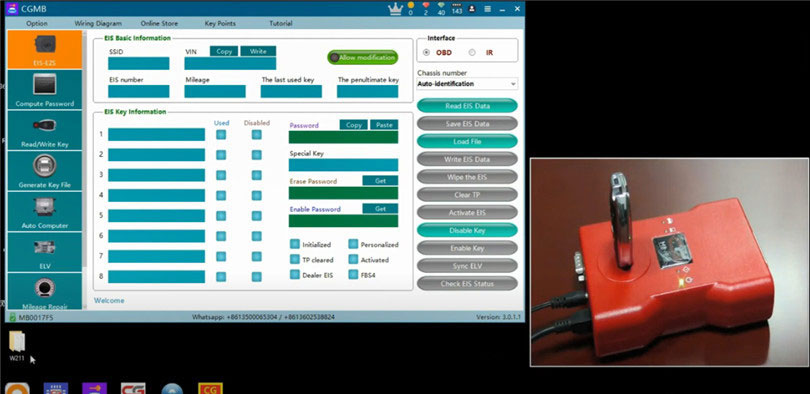
1. Writing a Benz Keyless Go Key
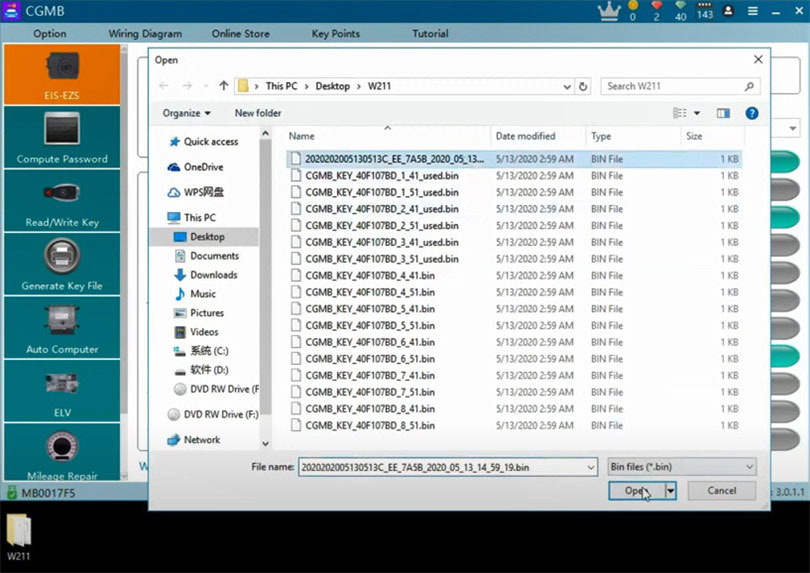
1). Navigate to EIS–EZS → OBD → Load File.
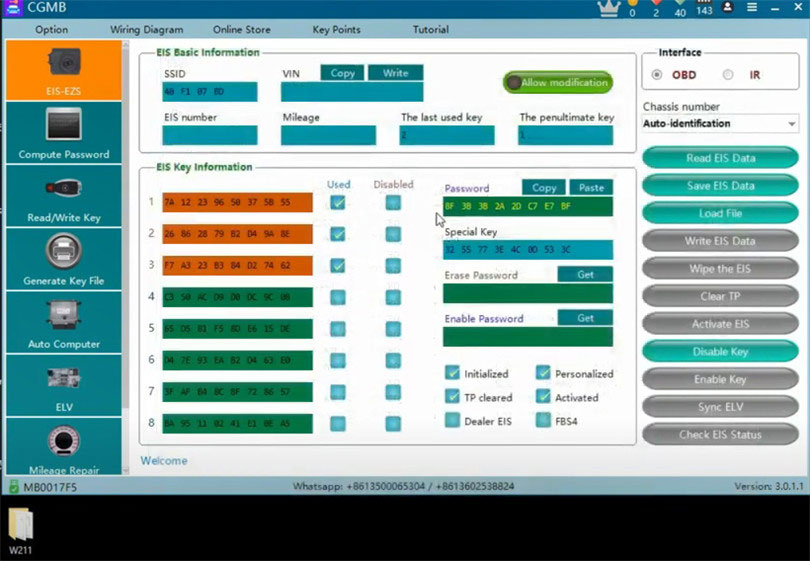
2). Select the original EIS data file containing the key information and password, then click Open.
- The EIS basic info and key password will load successfully.
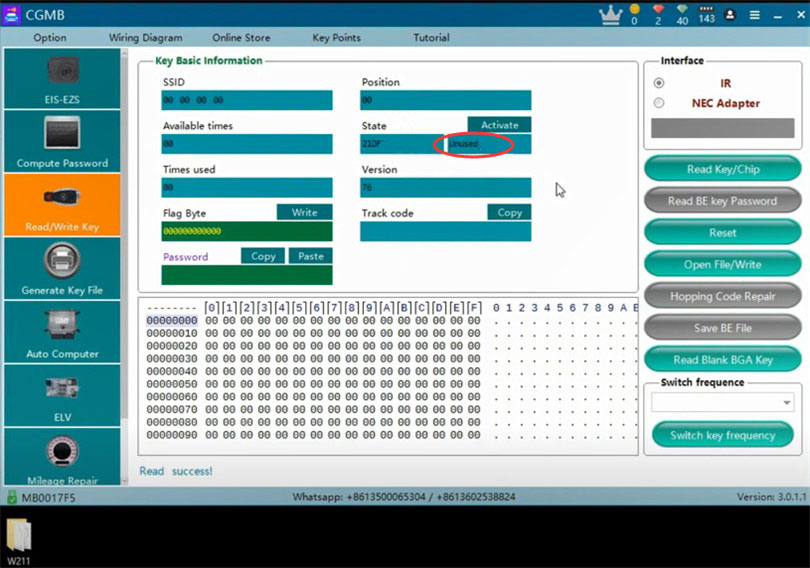
3). Go to Read/Write Key → Read Key/Chip.
- The key version shows 76, meaning it's a "killer cookie."
- The key status should display Unused.
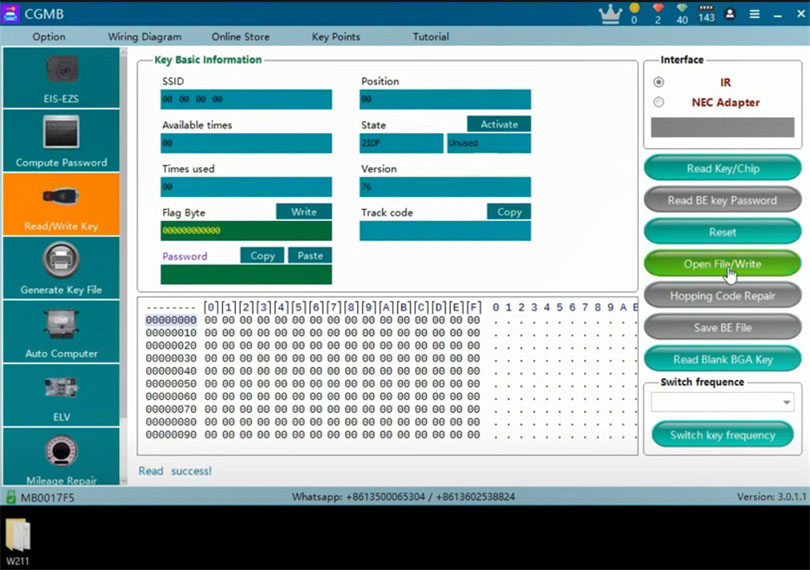
4). Click Open File / Write.
- Choose an unused 41-format file (e.g., key slot 4).
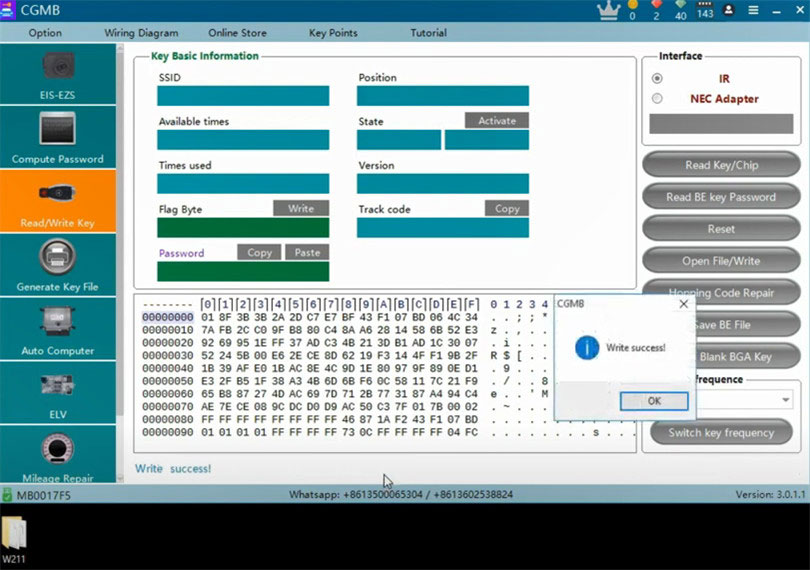
5). After writing succeeds, read the key/chip again.
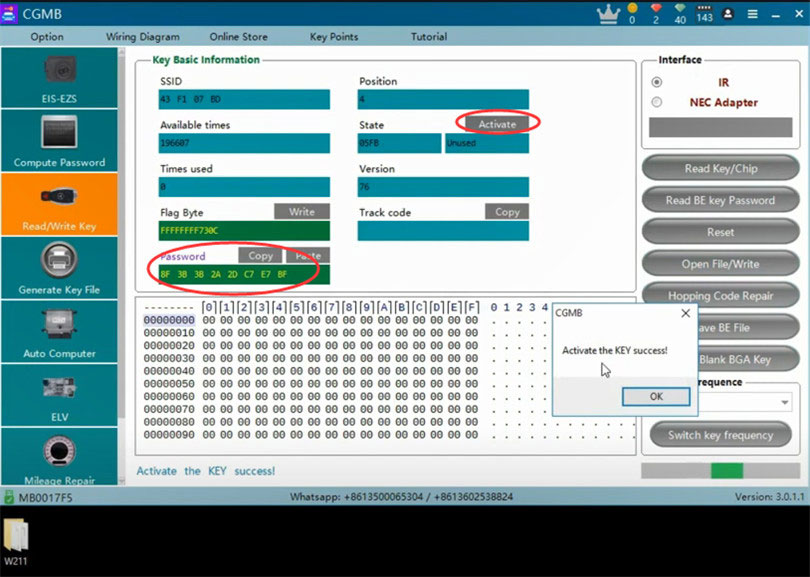
- The key status will still show Unused, so it must be activated.
Activate the Key
- If possible, activate the key in the vehicle for best results.
- If activating in software:
- Click Activate.
- Copy the key password from EIS/EZS and paste it into the Read/Write Key page.
- Ensure the key remains in the CGDI MB coil.
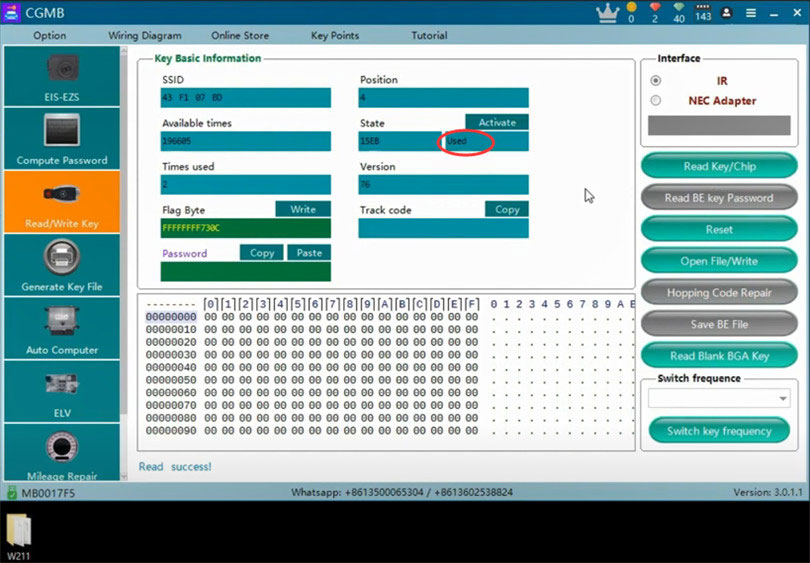
Once activation succeeds, read the key/chip again.
The key status should now show Used.
2. Resetting a Benz Keyless Go Key
Method 1: Manual Reset
1). Remove the key from the CGDI MB programmer.
2). Press the trunk button, then press the lock button while holding the trunk button.
- The red LED will turn on.
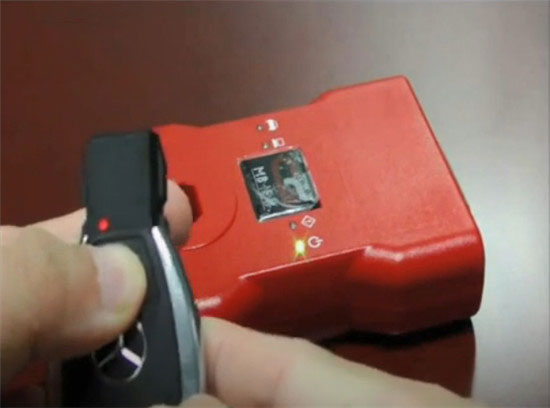
3). Press the unlock button.
- The red LED will turn off — this indicates a successful reset.
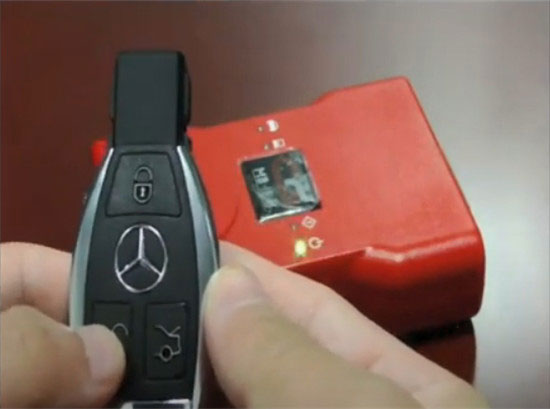
4). Place the key back on the CGDI MB coil and read the key/chip.
- The key status should now be Unused.
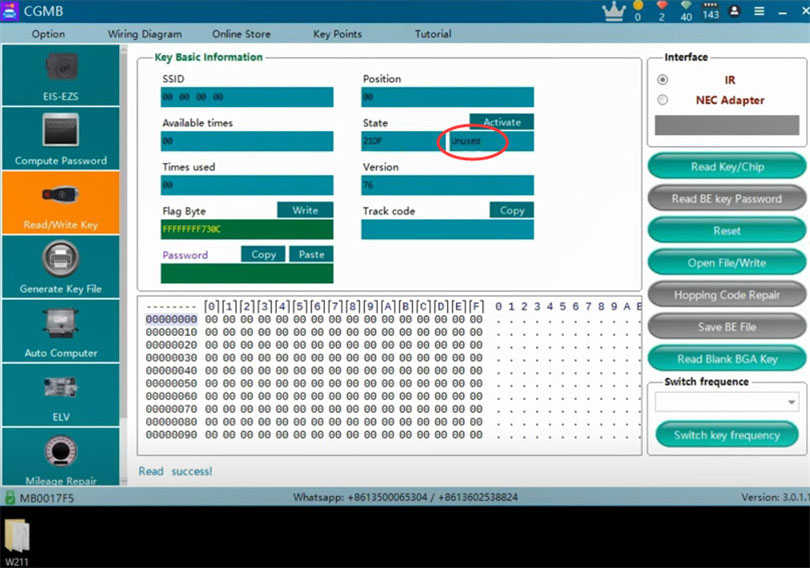
5). Select the 41-format file again (e.g., key 4), write it, and activate.
- The key status will change to Used.
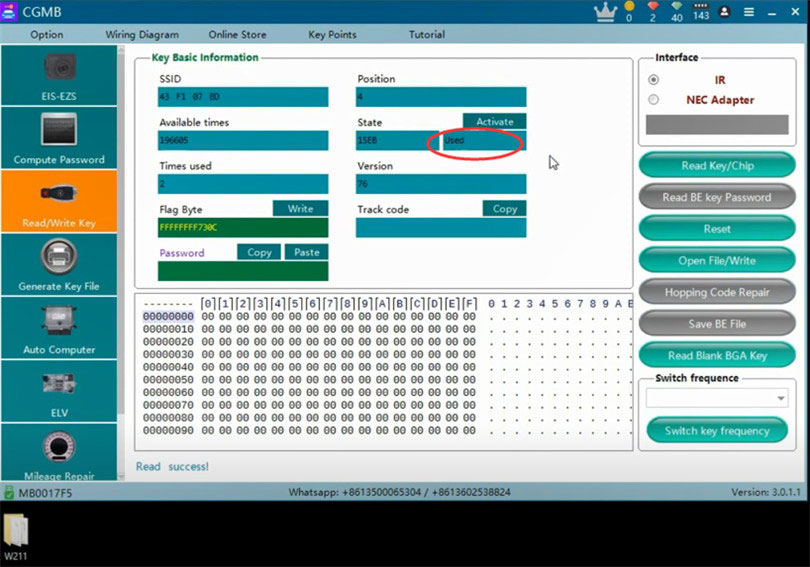
Method 2: Reset via CGDI MB Software
1). Click Reset.
2). The software will show Reset successful.
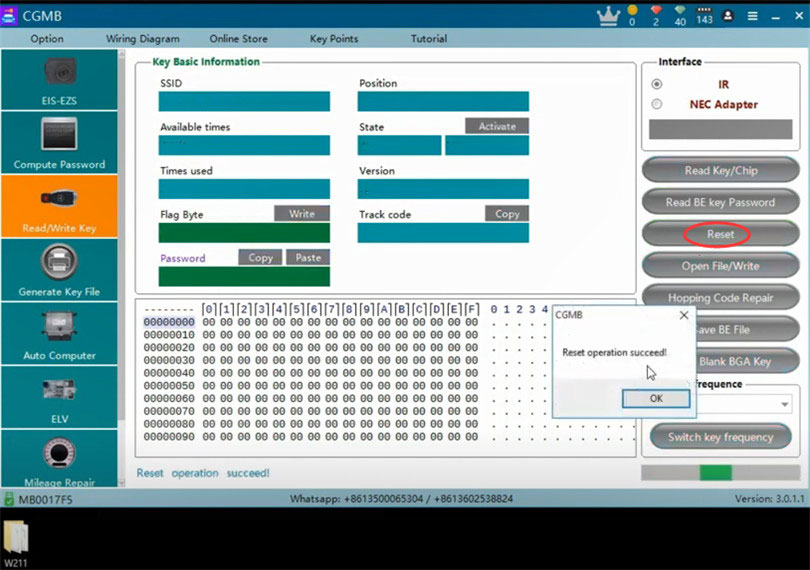
3). Read the key/chip again.
- The key status will change from Used to Unused.
Buy more and Save more


